

(English) A 2-Node Cluster in the vStack platform is a configuration consisting of two nodes that ensures the continuous operation of virtual machines and services in the event of a failure of one of the servers. Key principle: Both controllers in the HA pair must have access to the same data. The method used to implement this access determines the cluster type.
Why Use a 2-Node Cluster
A classic fault-tolerant cluster is typically associated with 3 or more nodes and external storage. However, real-world projects often face other constraints:
– a limited budget or resources;
– a small footprint (branch office, “on-premises” data center);
– the need to quickly deploy high availability for mission-critical services without complex infrastructure.
This is where the 2-node cluster comes in—a solution that enables high availability of applications and data on just two physical servers. If one node fails, the second automatically takes over the management of disk resources. Switchover time is minimal, and data remains intact. Using the vStack platform, you can build a full-fledged, highly available two-node virtualization cluster.
General Classification
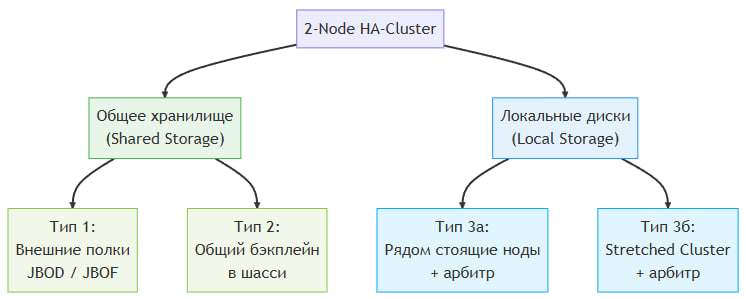
All 2-Node Cluster variants fall into two categories:
| Category | Operating Principle | Arbitrator |
| Shared Storage | The disks are physically “visible” to both controllers | Not required |
| Local Drives (Local Storage) | Each node has its own disks; data is replicated synchronously | Requires a mediator |
Based on these categories, vStack implements three main deployment types.
(English)
Deployment Type 1: External Disk Shelves (JBOD / JBDF)
Description
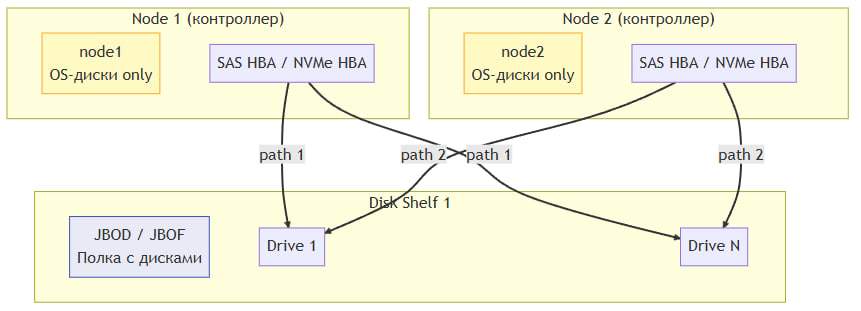
Both controllers are connected to external disk arrays (JBOD—Just a Bunch of Disks, or JBOF—Just a Bunch of Flash) via the cabling infrastructure and HBA adapters. The disks are physically accessible to each node simultaneously. Access control and the prevention of write conflicts are handled by software (for example, via SCSI Persistent Reservations).
Hardware Examples
– Dell PowerEdge R760 / R660
– HPE ProLiant DL380 Gen10 Plus
Advantages
– Storage scalability—new shelves can be added.
– No data replication —saves network and computing resources.
– Instant failover—no time is spent synchronizing copies.
– No arbiter required.
Limitations
– Higher cost (shelves + cables + HBA adapters).
– Nodes are physically tied to shelves.
– JBOF requires specialized dual-port NVMe drives.
– Additional cabling infrastructure is required.
(English)
Deployment Type 2. Dual-node chassis with a shared backplane
Description
Both nodes are housed in a single chassis, which features a built-in shared backplane. The disks are installed directly into the chassis and are accessible to both controllers via this backplane. This is specialized hardware originally designed for HA configurations.
Architecture
The backplane provides a dual-path connection to each disk:
– Path 1 — from Controller 1
– Path 2 — from Controller 2
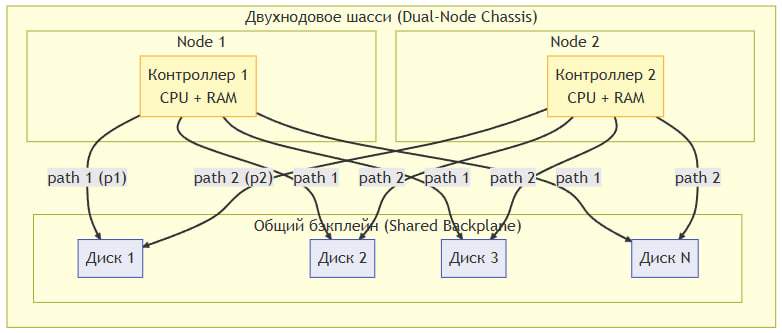
(English) Both controllers can see all the disks simultaneously. Write conflicts are prevented by the vStack clustering software.
Hardware Examples
– Supermicro BigTwin / TwinPro (SYS-2029BT-HNR) — 2 nodes in 2U, shared backplane for NVMe/SAS
– Supermicro FatTwin (SYS-F629P3-RTB) — 4 nodes in 4U (2 of the 4 are used for an HA pair)
– Dell PowerEdge C6620 — multi-node chassis with a shared backplane
– HPE ProLiant XL170r / XL190r — dual-node Apollo series chassis
– Lenovo ThinkSystem SD530 — dual-node in 1U with a shared backplane
Advantages
– Compact design—2 nodes + drives in a single chassis.
– Simple cabling.
– Low latency between nodes (internal bus).
– No arbiter required.
– Instant failover.
Limitations
– Specialized (more expensive) hardware.
– Limited number of disk slots in the chassis.
– Single point of failure—the chassis itself (power supply, backplane).
– No geo-distribution.
– Capacity scaling is limited.
Deployment Type 3: Independent Nodes with Local Disks
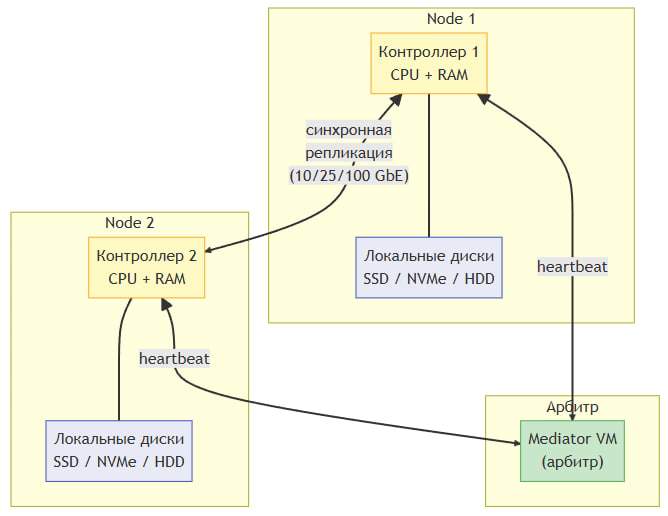
Each node is a fully autonomous server with its own local disks. The disks of one node are not physically accessible to another. Data integrity is ensured through synchronous replication between nodes at the vStack cluster software level.
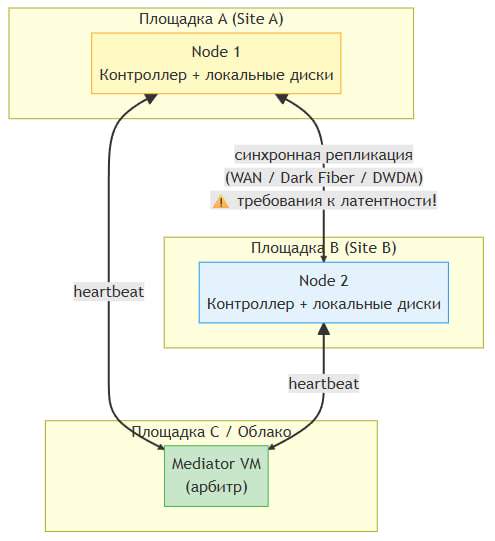
A critical component is the mediator. Since the nodes do not share a common storage system, a split-brain situation can occur if communication between them is lost. The mediator is an independent virtual machine that acts as the “third voice” in the quorum and prevents the cluster from splitting.
Type 3a. Adjacent Nodes
Both nodes are located in the same or adjacent server racks within the same data center. Synchronous data replication and heartbeat channels use a high-speed network.
(English)
Type 3b. Stretched Cluster (geographically distributed)
The nodes are located in different geographic sites (data centers). This provides protection against catastrophic failures affecting an entire site (fire, power outage, natural disaster).
(English)
Network Requirements
| Parameter | Adjacent Nodes | Stretched Cluster |
| Replication | 10/25/100 GbE (LAN) | WAN / Dark Fiber / DWDM |
| Latency (RTT) | < 1 ms | < 5 ms (recommended), < 10 ms (maximum) |
| Bandwidth | ≥ 10 Gbps | Depends on write load |
| Heartbeat | Dedicated VLAN or separate interface | Dedicated communication channel |
Mediator role
The Mediator is a required component for Type 3. It is a lightweight virtual machine that:
- Maintains a heartbeat with both cluster nodes.
- Determines the availability of each node.
- Votes in the quorum—if communication between nodes is lost, the mediator determines which node remains “alive” (primary) and which should be isolated (fenced).
- Prevents split-brain—ensures that only one node is serving data at any given time.
Requirements for the arbiter:
– Minimum computing resources: 1 vCPU, 512 MB RAM.
– Reliable network connectivity to both nodes.
– Deployment at a third independent site (or at least in an independent network segment)—especially critical for stretched clusters.
– The arbiter must not be located on the same physical servers as the cluster nodes.
Comparison of 2-Node Cluster Types
| Characteristics | Type 1: JBOD/JBOF | Type 2: Shared Backplane | Type 3a: Local Drives | Type 3b: Stretched Cluster |
| Shared Storage | Yes (external shelves) | Yes (chassis backplane) | No | No |
| Arbitrator | Not required | Not required | Required | Required |
| Data replication | No | No | Synchronous | Synchronous |
| Geographic distribution | No | No | No | Yes |
| Failover time | Instant | Instant | Seconds | Seconds |
| Cost | High (shelves + dual-port) | Medium-High (special chassis) | Low (standard equipment) | Medium (communication channels) |
| Capacity scalability | High (adding shelves) | Limited (chassis slots) | Limited (server slots) | Limited (server slots) |
| Hardware | Specialized (racks) | Specialized (chassis) | Standard | Standard |
| Deployment Complexity | Medium | Low | Medium | High |
| Site Failure Protection | No | No | No | Yes |
Recommendations for Choosing a Cluster Type
Based on this document,the following recommendations can be made:
– Choose Type 1 (external disk shelves) if you require maximum storage scalability, are prepared for higher costs, and can provide the necessary cabling infrastructure. Suitable for medium and large data centers.
– Choose Type 2 (dual-socket chassis) when compactness, low latency, and ease of installation are important, and disk scalability is not critical. Ideal for deployment in limited space.
– Choose Type 3 (independent nodes with replication) if you want to use standard servers, flexibility is important, and especially if you require protection against site-wide failure (stretched cluster). Make sure you can host the arbiter on a third, independent infrastructure, and that network latency between nodes does not exceed 10 ms (preferably 5 ms for a stretched cluster).
Typical use cases for a 2-node vStack cluster
1. Fault-tolerant virtualization at a branch office
Two compact servers + local storage + vStack cluster → all branch office services run on virtual machines with automatic restart.
2. Minimal HA cluster for mission-critical SMB services
Small business with a limited budget, but requiring redundancy and flexibility. A 2-node vStack cluster provides:
3. Edge services at the customer’s site
Caching, local databases, gateways, SCADA—anything that operates close to the data source and cannot always be moved to the cloud. A 2-node vStack cluster ensures local availability and manageability.

(English)
Conclusion
vStack offers three main types of 2-Node Clusters, each with its own advantages and limitations. Choosing the right architecture directly impacts the fault tolerance, cost, and scalability of your infrastructure. Use shared storage (types 1 and 2) for maximum performance and easy failover, or switch to replication with an arbiter (type 3) for geographic distribution and operation on standard hardware.
Telegram
Facebook
Instagram
Twitter